Informasi Forensik
Menyediakan data diagnostik yang mendalam
Selain hasil (tanggapan keberhasilan dan kesalahan), modul Teknologi Deep CDR™ juga menampilkan informasi forensik untuk file-file yang telah dibersihkan, yang memuat rincian mengenai apa yang terjadi selama proses berlangsung. Pengguna dapat melihat ringkasan informasi secara umum serta rincian tanggapan JSON untuk diagnosis yang lebih mendalam.
Penggunaan dalam Produk
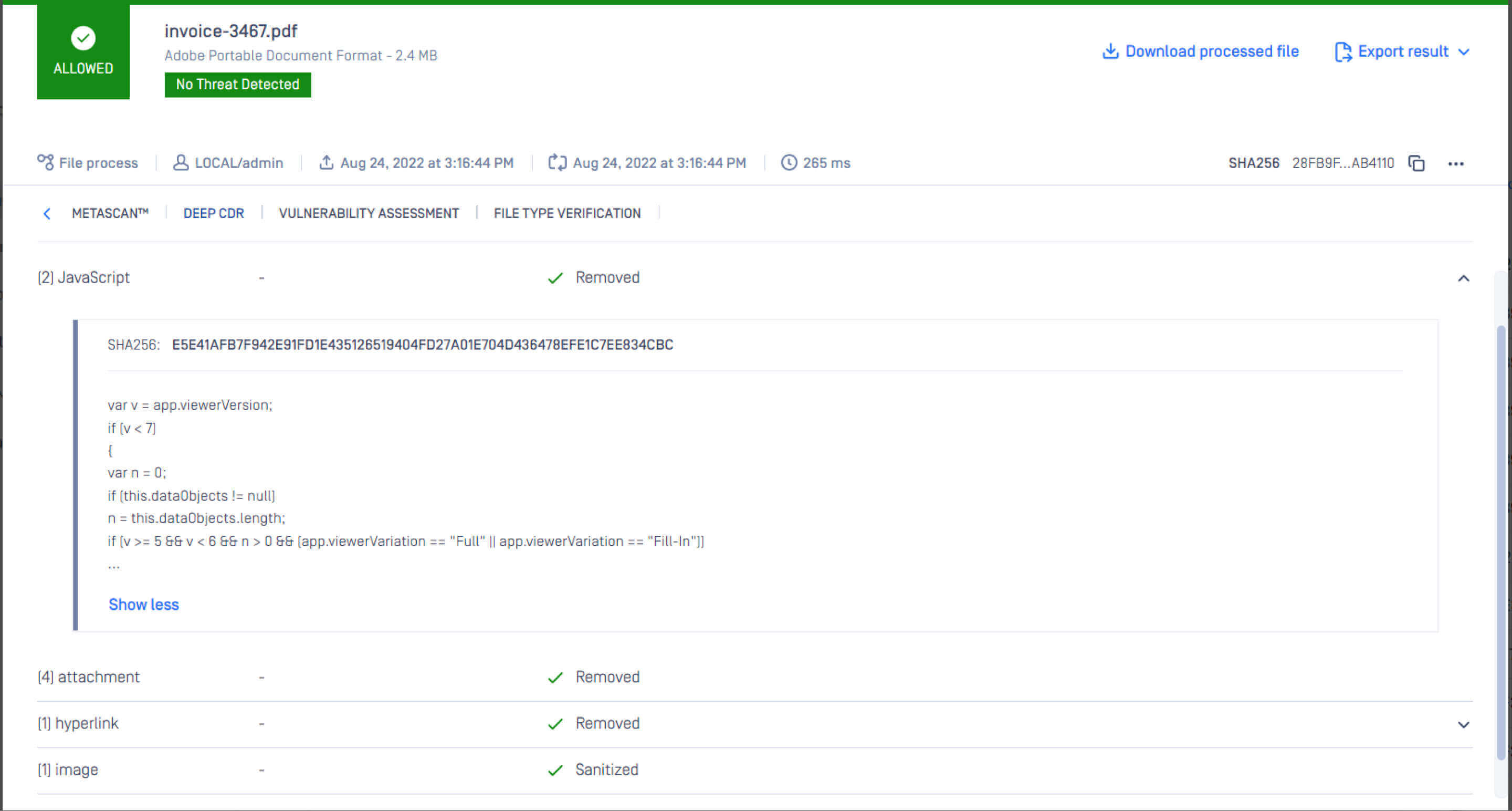
Pratinjau Pengembang Versi Awal
{
"description": "Proses sanitasi berhasil.",
"rincian": [
{
"tindakan": "dihapus",
"jumlah": 1,
"object_details": [
"var v = app.viewerVersion;\nif (v < 7)\n{\n\tvar n = 0;\n\tif (this.dataObjects != null)\n\t\tn = this.dataObjects.length;\n\tif (v >= 5 && v < 6 && n > 0 && (app.viewerVariation == \"Full\" || app.viewerVariation == \"Fill-In\"))\n\t{\n\t\tif (this.external)\n\t\t\tapp.alert(\"This document has file attachments. To view the attachments, click the Save button to save a copy of the document, open the copy in Adobe Acrobat DC, and use the File > Document Properties > Embedded Data Objects menu.\", 3, 0);\n\t\telse\n\t\t\tapp.alert(\"This document has file attachments. Use the File > Document Properties > Embedded Data Objects menu to view the attachments.\", 3, 0);\n\t}\n\telse if (v >= 6 && v < 7)\n\t{\n\t\tif (n == 0)\n\t\t{\n\t\t\tvar np = this.numPages;\n\t\t\tsyncAnnotScan();\n\t\t\tfor (var p = 0; p < np && n == 0; ++p)\n\t\t\t{\n\t\t\t\tvar annots = this.getAnnots(p);\n\t\t\t\tif (annots != null)\n\t\t\t\t{\n\t\t\t\t\tfor (var i = 0; i < annots.length; ++i)\n\t\t\t\t\t{\n\t\t\t\t\t\tif (annots[i].type == \"FileAttachment\")\n\t\t\t\t\t\t{\n\t\t\t\t\t\t\tn = 1;\n\t\t\t\t\t\t\tbreak;\n\t\t\t\t\t\t}\n\t\t\t\t\t}\n\t\t\t\t}\n\t\t\t}\n\t\t}\n\t\tif (n > 0)\n\t\t{\n\t\t\tif (this.external)\n\t\t\t\tapp.alert(\"This document has file attachments. To view the attachments, click the black triangle at the top of the document window's vertical scrollbar and choose File Attachments.\", 3, 0);\n\t\t\telse\n\t\t\t\tapp.alert(\"This document has file attachments. Use the Document > File Attachments menu to view the attachments.\", 3, 0);\n\t\t}\n\t}\n}\n"
],
"nama_objek": "JavaScript",
"object_sha256": [
"057b01826683300e04b0f96c03ddbfde1d464028de950dece763b916d7b4a776"
]
},
{
"tindakan": "dihapus",
"jumlah": 1,
"object_name": "lampiran"
},
{
"tindakan": "dihapus",
"jumlah": 1,
"object_name": "konten eksternal"
},
{
"tindakan": "dihapus",
"jumlah": 6,
"object_name": "bidang formulir"
},
{
"tindakan": "dihapus",
"jumlah": 6,
"object_details": [
"http://google.com",
"http://metascan-online.com",
"http://metadefender.com",
"http://cbs.iSkysoft.com/go.php...",
"https://metascan-online.com",
"http://www.google.com"
],
"nama_objek": "tautan",
"object_sha256": [
"aa2239c17609b21eba034c564af878f3eec8ce83ed0f2768597d2bc2fd4e4da5",
"528629a95451ab135ab205c7c5bed34c7558c23c48b50415aa7dc1b2aa615c36",
"16ae3209dcd61a65e598eb01aad34c51eee5f5e47cc853defafcc0ce50ed16a3",
"692968d0c0f57230d64b8e9ad4511ab38840bdaf33faab64d46413cc760d899b",
"e6ffbdf06681c914b782821cd36c9162757953e9cd503748deb9fa0e8d71784a",
"253d142703041dd25197550a0fc11d6ac03befc1e64a1320009f1edf400c39ad"
]
},
{
"action": "telah disterilkan",
"jumlah": 4,
"nama_objek": "gambar"
},
{
"tindakan": "dihapus",
"jumlah": 1,
"object_name": "tindakan halaman"
}
]
}